Debugging the Neo6502 over SWD: a Pico W as a probe
When the screen stays black and the serial port is silent, the RP2040's debug port is still there. A Pico W, three wires and OpenOCD: you read the board's memory while it runs, and even type at its keyboard for it.
On Olimex's Neo6502, the W65C02S runs the programs, but the RP2040 does everything else: DVI video, USB, files, sound. When working on our firmware fork, Trinity, the first tool is a terminal on a serial port. It has one limit: it assumes a firmware healthy enough to talk. The RP2040 also has a debug port, SWD, through which a probe reads and writes its memory over the bus, without asking the firmware anything — black screen or stuck firmware included. Here is our bench, the commands, and what it settled.
1. The bench
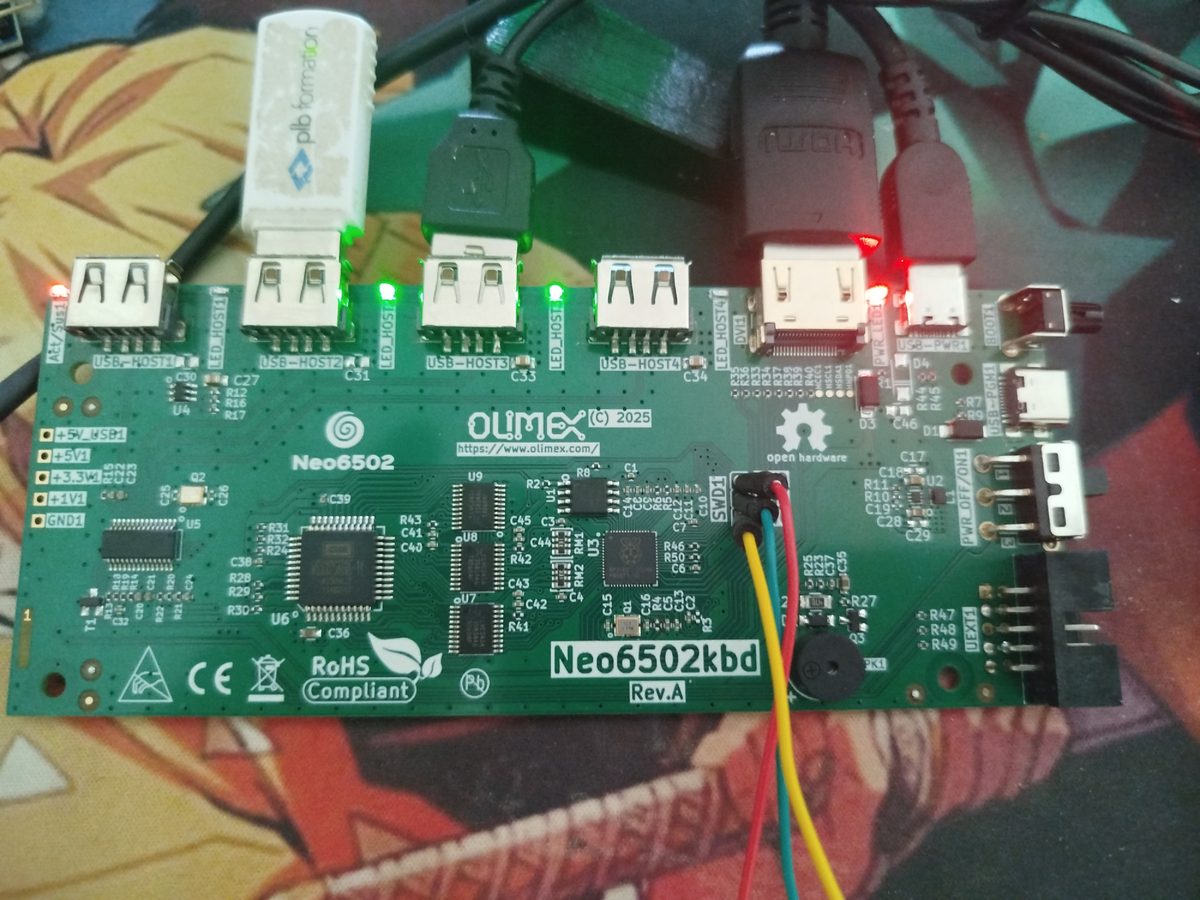
SWD1 header.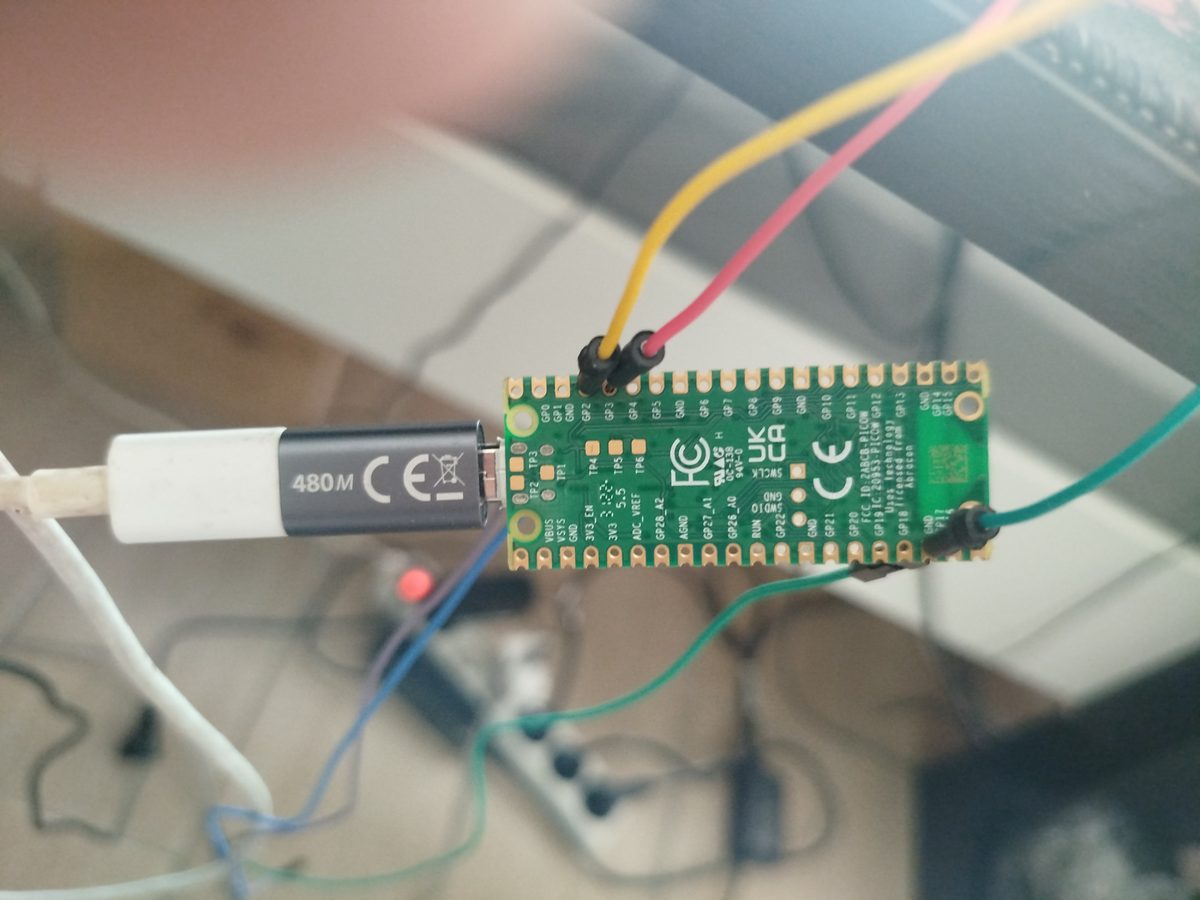
GP2, GP3 and a ground.Two boards, two USB cables: the Neo6502 is powered and connected to its display as usual; the Pico W is plugged into the PC, which sees it as a debug probe. Between them, just three wires.
2. The probe: a Pico W and three wires
The Pico W is flashed with debugprobe, Raspberry Pi's firmware that turns it into a CMSIS-DAP probe. The wiring, as recorded in our scripts:
| Pico W (probe) | Neo6502, SWD1 header |
|---|---|
GP2 | SWCLK (SWC) |
GP3 | SWDIO (SWD) |
GND | GND |
The board must be powered on its own side: the probe does not power it.
3. Connecting: OpenOCD
OpenOCD talks to the probe and to the RP2040:
openocd -f interface/cmsis-dap.cfg -c "set USE_CORE 0" -f target/rp2040.cfg \
        -c "adapter speed 1000" -c "init"
Once connected, read_memory and write_memory read and write any address while the board runs. The addresses of the firmware's variables change with every build: our scripts never hard-code them, they read them back from the ELF file of the flashed version.
arm-none-eabi-nm firmware.elf | awk '$3 == "frameCounter" { print "0x" $1 }'
# then, in OpenOCD:
read_memory 0x2000xxxx 16 1
4. Reading the running firmware: neoswd.sh
neoswd.sh reads a few firmware counters in a loop. The most useful is frameCounter, incremented by core 1 at the start of every video frame: still climbing means the signal lives and only the picture is wrong; frozen means the encoder has stopped. Alongside: lateTotal, episodes of late scanlines; stoSectorCount, sectors moved by the storage driver; and a sample of video memory, to tell an empty screen from an invisible one.
firmware/scripts/neoswd.sh 500            # counters every 500 ms
firmware/scripts/neopilot.sh "MODE 1" "DIR"   # types, then measures
5. Typing instead of the keyboard: neopilot.sh
With a black screen you no longer see what you type. neopilot.sh writes straight into the firmware's keyboard queue (queue and queueTail): one character every 40 ms, then Enter. It then samples, several times a second, the FIFO levels of the PIO that feeds the video, their error flags, the frame counter and the line count of the last frame. The exact same sequence, MODE 1 then DIR, can thus be replayed from one firmware to the next.
6. The rule: attach core 0 only
The RP2040 has two cores; in Trinity, core 1 produces the video. OpenOCD can attach to both, but attaching core 1 as well drops the encoder to 15 frames per second and invents a fault that is not there (measured on 25 September 2026). Hence set USE_CORE 0 in all our commands: the instrument must not touch the encoder. Another side effect, seen when core 1 had been given bus priority: even SWD reads failed, because the debug port shares that bus.
7. What the probe settled
During the black screen of the first DIR in Hercules mode, the probe showed that the frame counter kept its 60 frames per second, that video memory did contain the directory listing, and that lateTotal climbed during the disk read: neither a frozen firmware nor a cleared screen. That reading, and the ones that followed, disproved several explanations one after another, down to the real cause — a lock shared between the two cores. The whole hunt is told in A DIR that switches off the screen.
8. What we do not claim
The probe reads what the firmware stores in memory: the counters named here exist because we added them to Trinity, and their names are those of our fork, not of the official firmware. The scripts assume the exact ELF file of the flashed version. The pins of the
SWD1header are identified from the board's silkscreen; we only give the signals here.